Every feature, at a glance
InfoMetrIQ takes you from a blank canvas to clear answers. Here's everything it does.
Visual canvas builder
Design your survey the way you'd sketch it on a whiteboard.
- Drag questions onto an infinite canvas
- Draw an arrow from any answer to the next question
- Right-click to edit without leaving the canvas
- Every change saves automatically
AI survey generation (Paid plans)
Describe what you want to find out, and get a complete first draft in seconds.
- First survey free on every plan, with a guided wizard that explains each step
- Questions, answers and branching generated together
- Lands on the canvas, ready to edit
- Works in English and French
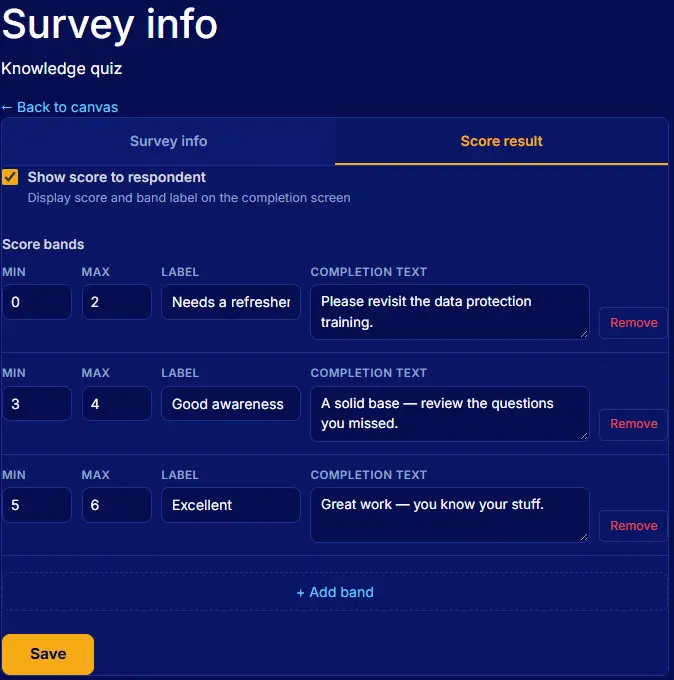
Scored surveys
Turn answers into a score, and the score into a result people understand.
- A score on every answer, a weight on every question
- Result bands with your own labels and text
- Show the score to respondents, or keep it for your team
- Great for assessments, quizzes and lead scoring
Filter results on the canvas
See not just what people answered, but the route they took.
- Click any answer to include or exclude those respondents
- Combine filters across questions
- Paths nobody took fade and turn grey
- Works with every question type
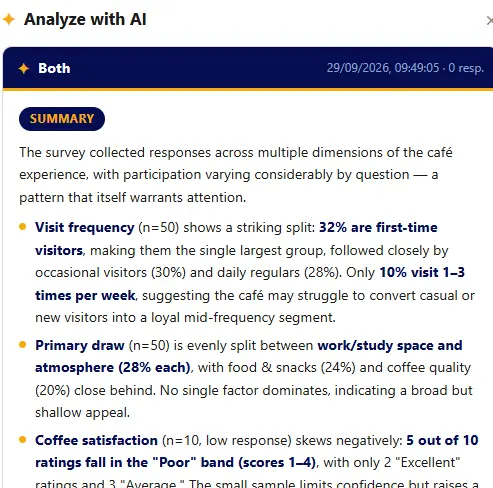
AI analysis
Get the story behind the numbers without reading every response.
- A structured summary of every question
- Themes pulled from free-text answers
- Every analysis saved, so you can compare runs

Customers & distribution
Send the right survey to the right people, and know who's replied.
- Keep contacts in one place
- Organise them into groups
- Email each person a personal survey link
- Import contacts from CSV Coming soon
- Track sends and deliveries Coming soon
Nine question types
Classic
Pick one answer
Dropdown
Pick from a long list
Multiple choice
Tick several answers
Range
Choose on a slider
Number
Enter a value
Date
Pick a date
A validated address
Free text
Answer in their own words
Ranking
Put options in order
Number, date, multiple-choice and ranking answers can all drive branching.
Also included
- Mobile-friendly survey player
- Progress bar and back button
- Custom welcome and thank-you text
- Redirect to your site when finished
- Draft, active and closed states
- Stop duplicate submissions
- Full English and French interface
- No tracking without your consent
Ready to get started?
A free account gives you the full canvas and up to 2 live surveys.